Quickstart Guide to Subversion on SourceForge

Good news! SourceForge now supports using Subversion for source control!

One complaint I received from developers who read my Quickstart Guide To Open Source Development With CVS and SourceForge is the sheer amount of complexity just to get started (not that it was my fault, I was just the messenger). With Subversion, contributing to a project on SourceForge is now much simpler.

Benefits of Subversion over CVS

Subversion has several key benefits over CVS, a few of which are listed here...

  • Subversion supports WEBDAV+DeltaV which works over HTTPS so that whole process of generating an SSH key is no longer necessary.
  • Checkins are atomic (“all or nothing”). This helps keep a check-in error from causing a broken build.
  • Subversion versions file and directory renames and moves.
  • Branching and tagging are fast as they are implemented as a copy operation within the repository.

Drawbacks to Subversion

The one key drawback to Subversion has to do with the last benefit listed. This was an architectural decision by the Subversion team to simplify and speed up branching and tagging. For branching, this is not such a bad idea. A branch is simply another folder within the repository. By convention, this tends to be a folder within a top-level “branches” folder.

For tags though, this is not as ideal because Subversion does not restrict editing tags. In fact, tagging as it is done in CVS does not exist in Subversion. Tagging is merely a convention developers follow by branching (a repository copy operation) to a subfolder of the top-level “tags” folder. To enforce a tag, one would have to implement a hook script to disable edits.

Software

Before we continue with this guide, please download the following tools.

  • TortoiseSVN - a Windows SVN client
  • Official SVN Client (OPTIONAL: for those who prefer a command line client, though this guide will focus on using TortoiseSVN).

Checking Out a Repository

At this point, you are all set to get going. One key difference between CVS and Subversion is that Subversion does not have the concept of a “module” like CVS. In Subversion, all your code is organized into folders within a repository.

  1. Make sure you’ve been added as a developer to the project you're going to work on. A project administrator would have to do this.
  2. In Windows Explorer go to the folder you wish to check the code out into.
  3. Right click and select the SVN Checkout command:
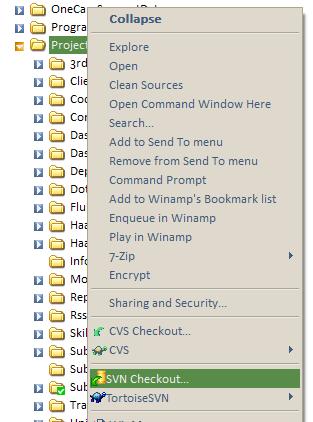
    Subversion Checkout context menu
  4. This will bring up the following checkout dialog. You will need to know the url of the project’s repository. This should simply be https://{project unix name}.svn.sourceforge.net/svnroot/{project unix name}. The URL to the project’s trunk is typically located at https://{project unix name}.svn.sourceforge.net/svnroot/{project unix name}/trunk. Note that the url is “https” and not “http”.

    For example, the URL to the Subtext repository is https://subtext.svn.sourceforge.net/svnroot/subtext. However, it is not a good idea to check out the top level repository folder (believe me). That will download every file in every tag and branch. Instead, you should enter the URL to the trunk. For Subtext, you would enter https://subtext.svn.sourceforge.net/svnroot/subtext/trunk
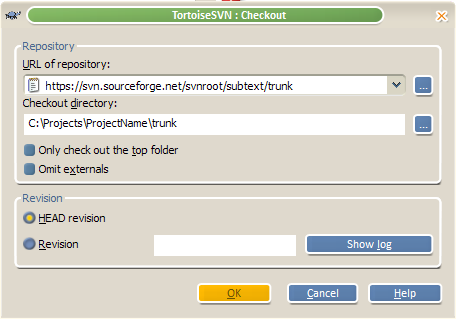
    TortoiseSVN Checkout Dialog
  5. TortoiseSVN will prompt you for your SourceForge username and password. You can optionally check a box to have it save your credentials so that you do not need to enter them every time.
  6. At this point, I received an invalid certificate dialog. Hopefully this will be fixed soon as it is not generally a good habit to accept an invalid certificate.
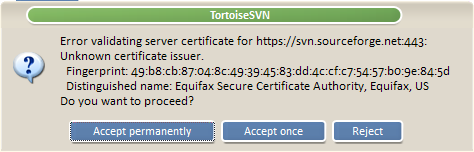
    Invalid Certificate Dialog
  7. Wait patiently as files are retrieved from the repository and copied to your local machine.

Now Write Some Code

Note that you only have to checkout the repository once. Afterwards you can run the update command to get changes committed by other developers. It's a good idea to do this before and after you make any changes.
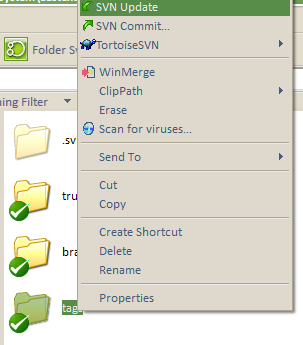
TortoiseSVN Update Context Menu

Commiting Changes

After you've changed some files, their icons be marked with an orange arrow. To commit your changes, right click and select the Commit command. Please make sure to enter an informative comment.
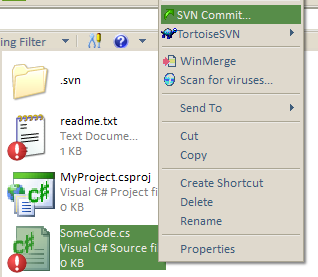
TortoiseSVN Commit Context Menu

To commit multiple changes, right click on the root folder and select Commit. You'llget a list of all changed files. You can check the ones you wish to commit and commit them in bulk.

Adding Files

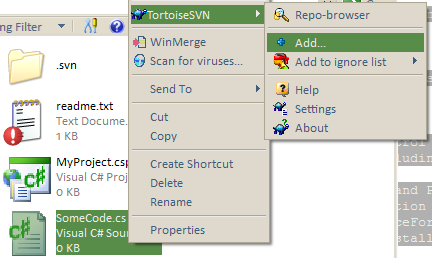
If you add a new file to the project, you'll need to add it to Subversion and then commit it. To add a file, simply right click on it and select "TortoiseSVN | Add".

TortoiseSVN Add File Context Menu

Know when to ignore

TortoiseSVN is not integrated with Visual Studio.NET. Thus it doesn't know that there are some files you do not want to add to Subversion such as *.suo, *.pdb and maybe the bin and obj folders. There are a couple ways to tell Subversion to ignore certain files.

The way Subversion handles ignored files is different from CVS. In CVS ignore settings are repository wide. For Subversion, the ignore list is a folder by folder setting. Thus ignoring a file within a folder does not necessarily apply that setting to its subfolders.

The quick way to add a specific file or file extension to the ignore list for a folder is to right click on the file and select TortoiseSVN | Add To Ignore List.
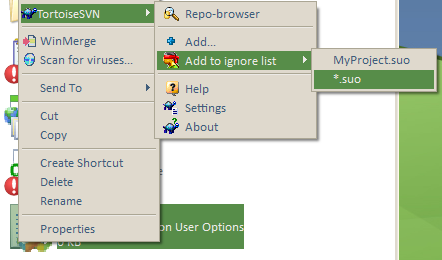
TortoiseSVN Add To Ignore List Context Menu

Since this ignore list only applies to the specific folder (and not to subdirectories), another approach is to setting an ignore list for the project is to right click the root folder and select the normal Windows Properties dialog. You will notice a Subversion tab in the dialog.
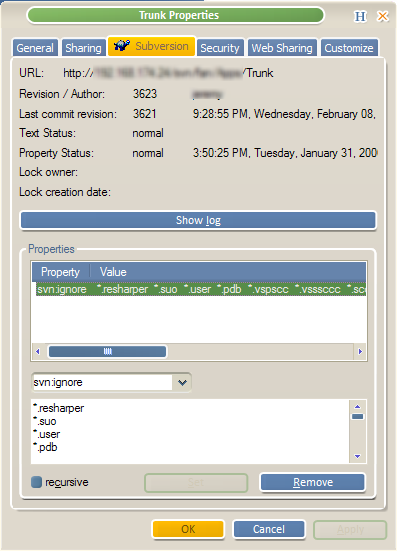
Subversion Property Dialog

This dialog allows you to specify various Subversion properties (meta-data) including one called svn:ignore. Select the svn:ignore property (or if it is not in the drop down, just type it in there). Underneath the drop down, you can type in wildcards for the file extensions to ignore. If you wish to set each sub-folder with the same svn:ignore values, then check the recursive checkbox before clicking Apply or OK.

Submitting Patches as a Non-Developer

If you do not have developer access, you can still submit patches to a project. In most SourceForge project sites, there is a “Patch” section where patches can be submitted. In order to learn how to submit and apply patches, read the following article Using a Windows version of GNU Patch.exe with CVS and Diff Files.

For More Information

Conclusion

Again, I hope this gets you on your feet when joining an open source project on SourceForge. By supporting Subversion, SourceForge has removed some of the complexity in getting involved. Subtext will be migrating to Subversion at some point in time. When we do so, I will be sure to update this document with any lessons learned.

What others have said

Requesting Gravatar... Ricky Dhatt Feb 22, 2006 11:07 PM
# re: Quickstart Guide to Subversion on SourceForge
ITYM "Drawbacks to Subversion", not "Drawbacks to CVS".

Also, you could enforce a tag/branch by setting a folder to read-only in Subversion (don't know if SourceForge prevents this or not)
Requesting Gravatar... Simone Chiaretta Feb 23, 2006 3:50 AM
# Re: Quickstart Guide to Subversion on SourceForge
When will Subtext move to SVN? :)
Requesting Gravatar... Steve Harman Feb 23, 2006 7:20 AM
# re: Quickstart Guide to Subversion on SourceForge
Simo...
I'm not sure if you saw the comment I made here [http://haacked.com/archive/2006/02/17/WhatEveryDeveloperShouldKnowAboutSourceControl.aspx#11847], but I was really tempted to "push the button" the other day. But then logic set in and I knew it was not the time... but I'll be pushing for a move to SVN soon after the 1.0 release... so soon!

Great article Phil! I too hope that this will help ease people into getting involved with/contributing to Open Source projects.

Now, I can't wait 'till _someone out there_ writes an app to tightly integrate SVN into Visual Studio. Though, on second thought... I've really gotten used to the TortoiseCVS/TortoiseSVN way of doing things through the windows explorer. But, then on a 3rd hand... I do love how Eclipse/Rational Application Developer [RAD] integrate so well with ClearCase in my work environment.
Requesting Gravatar... Haacked Feb 23, 2006 7:49 AM
# re: Quickstart Guide to Subversion on SourceForge
Ricky: thanks! I fixed the typo.

Steve: There is an add-in for VS.NET called Ankh. I've never tried it.

Simone: I'll take a poll soon.
Requesting Gravatar... Steve Harman Feb 23, 2006 8:02 AM
# re: Quickstart Guide to Subversion on SourceForge
I guess I kind of said the above a bit tounge-in-cheek...

However, I shouldn't sell anyone short as I've not tried Ankh in a long time (over year at least). I pseudo-evaluated it for version control of my own side projects and I ran into all kinds of issues. Though, in hind site I'm sure many of those were due to user (my) error. I say pseudo-evaluated b/c shortly there-after I started working with subText, and at that time my "side project" (my own dotText install) when by the wayside.

At any rate, once we move subText to SVN I'll be sure to give Ankh another shot, and no doubt be surprised at how well it works.
Requesting Gravatar... ragundo Feb 23, 2006 8:24 AM
# re: Quickstart Guide to Subversion on SourceForge
Sorry for the offtopic, but, the windows theme of the screenshots is fantastic. Is it possible to get it ?

Greetings from Spain
Requesting Gravatar... Steve Donie Feb 28, 2006 1:12 PM
# re: Quickstart Guide to Subversion on SourceForge
Nice article. I linked to it from my blog, where I posted an article yesterday on setting up a subversion server on Windows.
Requesting Gravatar... Joshua Flanagan Jun 27, 2006 6:25 AM
# re: Quickstart Guide to Subversion on SourceForge
TortoiseSVN has menu commands for creating and applying patches. No need to mess with GNU patch and diff.
Requesting Gravatar... Student Organization Guy Aug 29, 2006 1:21 AM
# re: Quickstart Guide to Subversion on SourceForge
I am finally moving away from my ancient RCS environment. Thanks for the clear step by step tutorial.
Requesting Gravatar... how to apply a GNU patch on Windows Oct 14, 2006 11:42 PM
# re: Quickstart Guide to Subversion on SourceForge
Using a Windows version of GNU Patch.exe with CVS and Diff Files“. should now probably refer to:

http://www.hanselman.com/blog/UsingAWindowsVersionOfGNUPatchexeWithCVSAndDiffFiles.aspx
Requesting Gravatar... Andy James Feb 01, 2007 1:36 AM
# re: Quickstart Guide to Subversion on SourceForge
Good thing that you cleared the right patch after all :)
Requesting Gravatar... Peter Mansion Feb 24, 2007 9:47 AM
# re: Quickstart Guide to Subversion on SourceForge
If you're having trouble writing to sourceforge then check that you have SVN enabled (in sourceforge) for each developer.

Pete
Requesting Gravatar... Monty Jun 07, 2007 10:05 AM
# re: Quickstart Guide to Subversion on SourceForge
Wow, my comment icon looks like the London Olympic Logo!
Requesting Gravatar... Welcome to Simon Philp's Blog Dec 09, 2007 8:08 AM
# Small Site Update
Small Site Update
Requesting Gravatar... Jonathan Dec 23, 2007 5:10 AM
# re: Quickstart Guide to Subversion on SourceForge
excellent step-by-step tutorial i only can recommend this and a nice explaining of the "all-in-one-package" thank you, its great!
Requesting Gravatar... rdeman Mar 28, 2008 8:10 AM
# re: Quickstart Guide to Subversion on SourceForge
when I signed up my SF.net project the welcome email only told me about CVS - not SVN.
It seems that https://{project unix name}.svn.sourceforge.net/svnroot/{project unix name}/ for my project doesnt exist -- any idea why?
Requesting Gravatar... David Piepgrass May 19, 2008 8:33 AM
# re: Quickstart Guide to Subversion on SourceForge
1. Make sure you’ve been added as a developer to the project you're going to work on. A project administrator would have to do this.

What's step zero: i.e. I am the administrator and I'd like to start using SVN on SF for the first time?
Requesting Gravatar... Michael Web Jul 27, 2008 6:18 AM
# re: Quickstart Guide to Subversion on SourceForge
Good thing that you cleared the right patch after all :) yes i also think it's quite genious.
Requesting Gravatar... Metagro Aug 26, 2008 4:59 AM
# re: Quickstart Guide to Subversion on SourceForge
Nice article. I linked to it from my blog, where I posted an article yesterday on setting up a subversion server on Windows.
Requesting Gravatar... Seo Beratung Oct 26, 2008 7:38 AM
# re: Quickstart Guide to Subversion on SourceForge
Thanks for your great step-by-step guide...
Requesting Gravatar... TechnoS Nov 02, 2008 7:04 AM
# re: Quickstart Guide to Subversion on SourceForge
I have been using http://ankhsvn.open.collab.net/ for quite a while now and it works pretty good. The svn server is local so everything is really fast.
Requesting Gravatar... TechnoS Nov 02, 2008 8:42 AM
# re: Quickstart Guide to Subversion on SourceForge
See below on how to enable SVN in SourceForge.
8thstring.blogspot.com/.../...-to-sourceforge.html
Requesting Gravatar... Matratze Nov 21, 2008 7:30 AM
# re: Quickstart Guide to Subversion on SourceForge
Your guide is really great and easy to understand. Thanks for publishing it... ;-)
Requesting Gravatar... Vibrationsplatte Dec 01, 2008 12:55 PM
# re: Quickstart Guide to Subversion on SourceForge
@ TechnoS: thanks a lot for your advice!
Requesting Gravatar... Fettabsaugung Dec 11, 2008 3:22 PM
# re: Quickstart Guide to Subversion on SourceForge
Really a nice and very informative article. I bookmarked it for sharing it with my friends.

Thanks for publishing these good infos... ;-)
Requesting Gravatar... Mobile SEO Dec 11, 2008 6:16 PM
# re: Quickstart Guide to Subversion on SourceForge
Phil, your article contains exactly the information I needed. Very good work. No I don't need to search anymore for these informations.
Requesting Gravatar... Partnersuche Dec 13, 2008 9:17 PM
# re: Quickstart Guide to Subversion on SourceForge
Your article helps us a lot, Phil. I've desperately looking for these infos by myself but I didn't find out, how to... Thanks for writing this interesting article, sharing this tips and saving my time!!!
Requesting Gravatar... Babyaufkleber Jan 09, 2009 3:08 AM
# re: Quickstart Guide to Subversion on SourceForge
Yes its a great and informative article.

Thanks for the infos!
Requesting Gravatar... Russland Visum Jan 10, 2009 3:59 AM
# re: Quickstart Guide to Subversion on SourceForge
SourceForge is for me a problem because of dato misuse.
Requesting Gravatar... Ledersofa Jan 12, 2009 3:11 AM
# re: Quickstart Guide to Subversion on SourceForge
Hello Russalnd Visum: source forge is becoming better and sure.
Requesting Gravatar... Agentur Feb 22, 2009 9:17 AM
# re: Quickstart Guide to Subversion on SourceForge
Nice article, Phil. If you don't mind I would like to link to it from my own website.
Best wishes from Germany!
Requesting Gravatar... Messie Beratung Mar 30, 2009 9:06 AM
# re: Quickstart Guide to Subversion on SourceForge
This site is very well designed. Nice use of colors and typography!
Requesting Gravatar... Matratze Apr 16, 2009 4:12 AM
# re: Quickstart Guide to Subversion on SourceForge
This is a very good work. I have put your side down into my favorite.
Requesting Gravatar... Handy Bundle Notebook Apr 25, 2009 12:32 PM
# re: Quickstart Guide to Subversion on SourceForge
There have been issues with sourcefourge a few weeks ago. Wasn´t it sonething with data protection?
Requesting Gravatar... Energie-Man May 12, 2009 6:14 AM
# re: Quickstart Guide to Subversion on SourceForge
Thanks for that info . Very useful
Requesting Gravatar... Stefan May 18, 2009 2:50 PM
# re: Quickstart Guide to Subversion on SourceForge
Thanks for this detailed representation. We use subversion for some projects. And for the new developers it is a great manual.
Requesting Gravatar... Klaus May 20, 2009 11:26 PM
# re: Quickstart Guide to Subversion on SourceForge
Thanks for that Info. Vielen Dank für diese Information
Requesting Gravatar... michael sommer Jun 08, 2009 4:52 AM
# re: Quickstart Guide to Subversion on SourceForge
great work, step by step..... easy to understand.
thanks!
Requesting Gravatar... Mp3 Jun 12, 2009 7:01 AM
# re: Quickstart Guide to Subversion on SourceForge
Thanks for the guide,
explained very well !
Requesting Gravatar... online werbung Jun 26, 2009 3:58 AM
# re: Quickstart Guide to Subversion on SourceForge
..was looking for a guide like that. Thank you so much.
Requesting Gravatar... Rieger Jun 26, 2009 10:30 AM
# re: Quickstart Guide to Subversion on SourceForge
Thanks for this great step by step description

What do you have to say?

(will show your gravatar)
Please add 4 and 3 and type the answer here: