ASP.NET Routing Debugger

In Scott Hanselman’s wonderful talk at Mix, he demonstrated a simple little route tester I quickly put together.
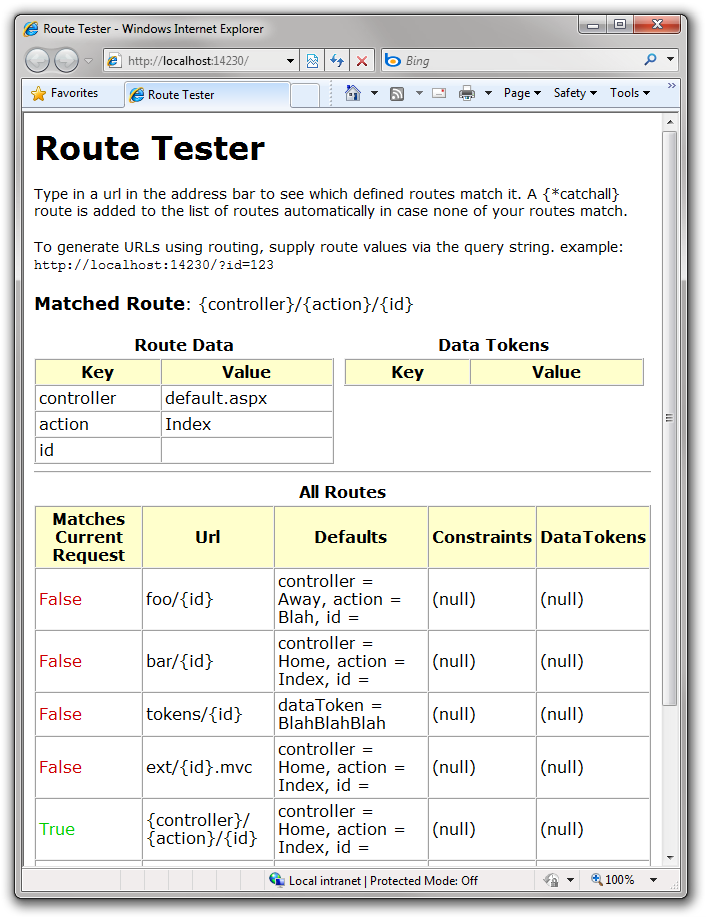
Route Tester - Windows Internet Explorer (2)

This utility displays the route data pulled from the request of the current request in the address bar. So you can type in various URLs in the address bar to see which route matches. At the bottom, it shows a list of all defined routes in your application. This allows you to see which of your routes would match the current URL.

The reason this is useful is sometimes you expect one route to match, but another higher up the stack matches instead. This will show you that is happening. However, it doesn’t provide any information why that is happening. Hopefully we can do more to help that situation in the future.

To use this, simply download the following zip file and place the assembly inside of it into your bin folder. Then in your Global.asax.cs file add one line to the Application_Start method (in bold).

protected void Application_Start(object sender, EventArgs e)
{
  RegisterRoutes(RouteTable.Routes);
  RouteDebug.RouteDebugger.RewriteRoutesForTesting(RouteTable.Routes);
}

This will update the route handler (IRouteHandler) of all your routes to use a DebugRouteHandler instead of whichever route handler you had previously specified for the route. It also adds a catch-all route to the end to make sure that the debugger always matches any request for the application.

I’m also making available the full source (using the word full makes it sound like there’s a lot, but there’s not all that much) and a demo app that makes use of this route tester. Let me know if this ends up being useful or not for you.

Technorati Tags: ,,

What others have said

Requesting Gravatar... Cleve Littlefield Mar 13, 2008 5:58 PM
# re: Url Routing Debugger
It would be nice if similar to the way you can view Page.Trace events in if you had this was built-in viewer but configurable to shut off if this is the production site.
Requesting Gravatar... [mRg] Mar 14, 2008 4:59 AM
# re: Url Routing Debugger
Awesome thanks Phil .. this will be very useful :)
Requesting Gravatar... Perry Mar 14, 2008 5:15 AM
# re: Url Routing Debugger
Thanks Phil!

When I saw this at Mix I was hoping you guys would release it even though it's not hard to do myself. I just felt this is one of those things to DRY ;)
Requesting Gravatar... Srikanth Mar 14, 2008 1:29 PM
# re: Url Routing Debugger
Thanks Phil. Happen to see two web.config in the demo app and got an error "It is an error to use a section registered as allowDefinition='MachineToApplication' beyond application level. This error can be caused by a virtual directory not being configured as an application in IIS.".

http://forums.devarticles.com/net-development-43/section-registered-as-allowdefinition-machinetoapplication-beyond-application-level-10027.html

It seems the issue is, not to have two web.config inside the same solution, once i got rid of the web.config for the web app all golden!
Requesting Gravatar... Ben Scheirman Mar 14, 2008 11:44 PM
# re: Url Routing Debugger
Phil, any particular reason why this code accepts a route collection as a method parameter, but then goes ahead and accesses the RouteTable.Routes singleton directly?

Is this an oversight, or is there a reason you did this?

(I told Scott that we should call this BettererRouteHandler. Think about it...)
Requesting Gravatar... Haacked Mar 18, 2008 6:21 PM
# re: Url Routing Debugger
@Ben Yep, that's an oversight. Doh!
Requesting Gravatar... Haacked Mar 18, 2008 6:28 PM
# re: Url Routing Debugger
@Ben Fixed!
Requesting Gravatar... Damian Powell Mar 26, 2008 2:04 AM
# re: Url Routing Debugger
Nice one, Phil. As Cleve pointed out, it would be nice if this information was printed out *after* the normal processing of a page. If I get around to doing that, I'll send a copy back to you.
Requesting Gravatar... Brandon May 27, 2008 10:10 PM
# re: ASP.NET Routing Debugger
Just wanted to say thanks. I was stuck; this unstuck me. You're the man, Phil. Thank you.
Requesting Gravatar... Christian Schiffer Jun 03, 2008 9:20 AM
# re: ASP.NET Routing Debugger
Hi thanks for this great tool. I tested it with preview 3 though and its not working, for some reason preveiw 3 of System.Web.Routing stated its version number to be 0.0.0.0 and obviously that there is a version conflict between my project and your dll.

Will you do an update anytime soon?
Requesting Gravatar... Some One Jun 03, 2008 5:35 PM
# re: ASP.NET Routing Debugger
We kinda get the source code. One area we don't is with the Routing HTTP Module. This along with reflector helps explain what is going on inside system.web.routing. Thanx.
Requesting Gravatar... Billy Ho Jun 16, 2008 8:16 PM
# re: ASP.NET Routing Debugger
To make the RouteDebugger works with ASP.Net MVC Preview 3.

All you have to do are the following items:

1. Obtain the source code from the path below:
http://haacked.com/code/RouteTesterDemo.zip

2. Replace the follow assemblies in the \RouteTesterDemo\Dependencies directory with their ASP.Net MVC Preview 3 counterparts:
System.Web.Abstractions.dll
System.Web.Mvc.dll
System.Web.Routing.dll

3. Rebuild the RouteDebug project.

The compiled assemblies which works with ASP.Net MVC Preview 3 can be obtained from the following path:
\RouteTesterDemo\RouteTester\bin\Debug\RouteDebug.dll


To make the sample project RouteTesterDemoWeb works with ASP.Net MVC Preview 3, a few addition steps are required:
1. In HomeController.cs
Modify:
RenderView("Index");
To:
View("Index");
2. In Web.Config
Repalce all:
"System.Web.Routing, Version=3.5.0.0, Culture=neutral, PublicKeyToken=31BF3856AD364E35"
With:
"System.Web.Routing, Version=0.0.0.0, Culture=neutral, PublicKeyToken=31BF3856AD364E35"
3. In Web.Config
Replace all:
"System.Web.Abstractions, Version=3.5.0.0, Culture=neutral, PublicKeyToken=31BF3856AD364E35"
With:
"System.Web.Abstractions, Version=0.0.0.0, Culture=neutral, PublicKeyToken=31BF3856AD364E35"
4. Rebuild the solution
5. Launch your favourite web browser and test with the URL like below:
http://localhost:14230/Home/Index
(replace the port number 14230 to the one your Visual Studio.Net is using)

Requesting Gravatar... Richard Dingwall Jun 28, 2008 11:56 PM
# re: ASP.NET Routing Debugger
Thanks Billy - your instructions worked like a charm. I've uploaded updated ASP.NET MVC Preview 3 versions for anyone in a hurry: grab routedebug-preview3-binary.zip or routetesterdemo-preview3.zip. Cheers.
Requesting Gravatar... Simone Jul 01, 2008 2:41 PM
# re: ASP.NET Routing Debugger
I remember someone posted a upgraded version of this tool that allowed switching on and off with a simple query string parameter, but cannot find it anymore.

What do you have to say?

(will show your gravatar)
Please add 4 and 2 and type the answer here: