VS2008 Web Server Here Shell Extension

UPDATE: Updated the registry settings per James Curran’s comment. Thanks James!

One of the most useful registry hacks I use on a regular basis is one Robert McLaws wrote, the “ASP.NET 2.0 Web Server Here” Shell Extension. This shell extension adds a right click menu on any folder that will start WebDev.WebServer.exe (aka Cassini) pointing to that directory.
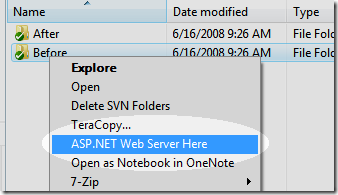
Webserver-Here

I recently had to repave my work machine and I couldn’t find the .reg file I created that would recreate this shell extension. When I brought up Robert’s page, I noticed that the settings he has are out of date for Visual Studio 2008.

Here is the updated registry settings for VS2008 (note, edit the registry at your own risk and this only has the works on my machine seal of approval).

32 bit (x86)

Windows Registry Editor Version 5.00

[HKEY_LOCAL_MACHINE\SOFTWARE\Classes\Directory\shell\VS2008 WebServer]
@="ASP.NET Web Server Here"

[HKEY_LOCAL_MACHINE\SOFTWARE\Classes\Directory\shell\VS2008 WebServer\command]
@="C:\\Program Files\\Common Files\\microsoft shared\\DevServer
\\9.0\\Webdev.WebServer.exe /port:8080 /path:\"%1\""

64 bit (x64)

Windows Registry Editor Version 5.00

[HKEY_LOCAL_MACHINE\SOFTWARE\Classes\Directory\shell\VS2008 WebServer]
@="ASP.NET Web Server Here"

[HKEY_LOCAL_MACHINE\SOFTWARE\Classes\Directory\shell\VS2008 WebServer\command]
@="C:\\Program Files (x86)\\Common Files\\microsoft shared\\DevServer
\\9.0\\Webdev.WebServer.exe /port:8080 /path:\"%1\""

For convenience, here is a zip file containing the reg files. The x64 one I tested on my machine. The x86 one I did not. If you installed Visual Studio into a non-standard directory, you might have to change the path within the registry file.

What others have said

Requesting Gravatar... James Curran Jun 24, 2008 1:38 PM
# re: VS2008 Web Server Here Shell Extension
[HKEY_LOCAL_MACHINE\SOFTWARE\Classes\Folder\shell\VS2008 WebServer]
@="ASP.NET Web Server Here"


NoNoNoNo...

[HKEY_LOCAL_MACHINE\SOFTWARE\Classes\Directory\shell\VS2008 WebServer]
@="ASP.NET Web Server Here"

Unless you really want it displaying on Control Panel and Printers and Network Neighborhood.
Requesting Gravatar... Dragan Panjkov Jun 24, 2008 1:39 PM
# re: VS2008 Web Server Here Shell Extension
This one is excellent one! You should've post that seal like Hanselman did on his blog :)
Requesting Gravatar... Scott Galloway Jun 24, 2008 10:32 PM
# re: VS2008 Web Server Here Shell Extension
Very nice indeed!
Requesting Gravatar... Egil Hansen Jun 24, 2008 11:56 PM
# re: VS2008 Web Server Here Shell Extension
Eff... sweet! Great work.
Requesting Gravatar... Storm Jun 25, 2008 11:36 AM
# re: VS2008 Web Server Here Shell Extension
hmmm, I have no words to describe the feelings I have right now. Suffice to say I am in awe. I've been wondering about this very topic for over a year now though it's never been a priority to actually google it.

Many thanks!
Requesting Gravatar... Tuna Toksoz Jun 25, 2008 1:44 PM
# re: VS2008 Web Server Here Shell Extension
cmd /c start /D"C:\Program Files (x86)\Common Files\microsoft shared\DevServer\9.0\" Webdev.WebServer.exe /port:%%random%% /path:"%1"

It assigns a random port for the webserver. The only drawback so far is you see command prompt momenratily when you click "ASPNET WebServer here" extension.
Requesting Gravatar... Tuna Toksoz Jun 25, 2008 2:00 PM
# re: VS2008 Web Server Here Shell Extension
Windows Registry Editor Version 5.00

[HKEY_LOCAL_MACHINE\SOFTWARE\Classes\Directory\shell\VS2008 WebServer]
@="ASP.NET Web Server Here"

[HKEY_LOCAL_MACHINE\SOFTWARE\Classes\Directory\shell\VS2008 WebServer\command]
@="cmd /c start /D\"C:\\Program Files (x86)\\Common Files\\microsoft shared\\DevServer\\9.0\\\" Webdev.WebServer.exe /port:%%random%% /path:\"%1\""

and here is the registry changes for 64 bit
Requesting Gravatar... Storm Jun 25, 2008 8:50 PM
# re: VS2008 Web Server Here Shell Extension
Isn't there a good chance that it may then grab a port already in use?
Requesting Gravatar... Tuna Toksoz Jun 25, 2008 9:14 PM
# re: VS2008 Web Server Here Shell Extension
@Storm Unfortunately, there is. I may write the piece of command to generate random numbers between 100 and 65535 but there is still possibility to grab a port already in use. But at least it will work most of the time :)
Requesting Gravatar... ado.net programming Jul 02, 2008 12:09 PM
# re: VS2008 Web Server Here Shell Extension
port:%%random%%

excellent! as you say "work most of the time" and that's good enough for me. Thanks
Requesting Gravatar... Mark Wisecarver Jul 04, 2008 3:27 AM
# re: VS2008 Web Server Here Shell Extension
I can't believe this works so well on Vista but it does. :-)
One thing...Anyone have a fix for the Image resizing?
Running Cassini this way VS. with VS2008 distorts image sizing.

What do you have to say?

(will show your gravatar)
Please add 1 and 5 and type the answer here: